
In today’s fast-moving software world, speed is everything.
Teams release features daily—even hourly.
But here’s the problem 👇
Speed without security leads to breaches, downtime, and lost trust.
That’s where DevSecOps comes in.
Simple Definition of DevSecOps
DevSecOps = Development + Security + Operations
DevSecOps means building security into every stage of the DevOps process, instead of adding it at the end.
👉 Security is everyone’s responsibility, not just the security team’s job.
Why Traditional DevOps Is Not Enough
In traditional DevOps:
-
Developers write code
-
Ops teams deploy it fast
-
Security checks happen at the end
This causes problems:
❌ Security issues found too late
❌ Release delays
❌ Production vulnerabilities
❌ Last-minute firefighting
DevSecOps fixes this by shifting security left (earlier in the lifecycle).
How DevSecOps Works (Step by Step)
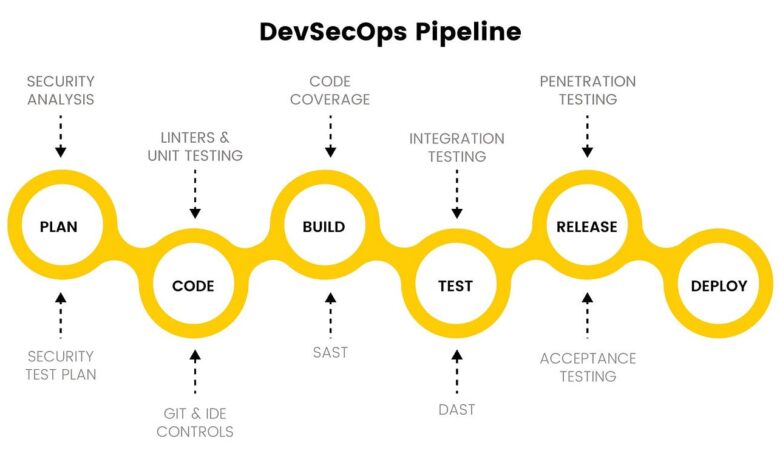
DevSecOps integrates security into each phase of the DevOps lifecycle.
1) Plan & Design
-
Threat modeling
-
Secure architecture design
-
Security requirements defined early
2) Code
-
Secure coding practices
-
Static code analysis (SAST)
-
Secrets scanning (no hardcoded passwords)
3) Build
-
Dependency vulnerability scanning
-
License compliance checks
-
Container image scanning
4) Test
-
Dynamic security testing (DAST)
-
API security tests
-
Automated security test cases
5) Deploy
-
Infrastructure as Code (IaC) security checks
-
Secure configurations
-
Policy enforcement
6) Monitor
-
Runtime security monitoring
-
Log analysis
-
Incident detection and response
Key Principles of DevSecOps
🔐 Security by design – Not an afterthought
🤖 Automation first – Manual security doesn’t scale
🔄 Continuous security – Always running, always improving
🤝 Shared responsibility – Dev, Ops, and Security work together
Why DevSecOps Matters Today (More Than Ever)
1. Rising Cyber Attacks
Attackers now target:
-
CI/CD pipelines
-
Open-source libraries
-
Cloud misconfigurations
DevSecOps helps catch these risks early.
2. Faster Releases Need Faster Security
Manual security checks slow teams down.
DevSecOps uses automation, so security keeps up with speed.
3. Cloud & Containers Are Everywhere
Modern apps use:
-
Kubernetes
-
Containers
-
Microservices
-
Cloud infrastructure
DevSecOps ensures these environments are secure by default.
4. Compliance Is Mandatory
Industries like finance and healthcare need:
-
Audits
-
Logs
-
Security controls
DevSecOps builds compliance into pipelines, not after deployment.
Common DevSecOps Tools (Examples)
-
Code security: SonarQube, Checkmarx
-
Dependency scanning: Snyk, OWASP Dependency-Check
-
Container security: Trivy, Aqua
-
Secrets management: Vault, AWS Secrets Manager
-
Monitoring: Prometheus, ELK, Falco
(Tools help—but mindset matters more.)
Example 1: Preventing a Security Bug Before Production
❌ Without DevSecOps
A developer pushes new code.
The app works fine.
After deployment, hackers exploit a vulnerable library.
👉 Result: Data breach, emergency patch, angry users.
✅ With DevSecOps
-
Code is scanned automatically during commit
-
A vulnerable dependency is detected
-
Pipeline fails immediately
-
Developer fixes it before merge
Outcome:
✔ No production issue
✔ No downtime
✔ No panic
➡️ Security shifted left saved the day.
Example 2: Secure Container Images in Kubernetes
❌ Without DevSecOps
-
Developers build container images quickly
-
Images contain outdated OS packages
-
Known vulnerabilities exist
-
App gets compromised in runtime
✅ With DevSecOps
-
Container image is scanned during build
-
High-severity vulnerabilities are found
-
Pipeline blocks deployment
-
Image is rebuilt with patched packages
Outcome:
✔ Secure containers
✔ Safer Kubernetes clusters
✔ Reduced attack surface