Today, many companies want to release features faster, handle more users, and avoid application downtime.
Because of this, they are moving from old monolithic applications to microservices architecture.
But this change is not easy.
It works well only when DevOps practices are applied properly.
Let’s understand this in very simple language 👇
What Is a Monolith Application?
A monolith is a single big application:
-
One codebase
-
One deployment
-
One failure can bring the whole app down
Example:
If login fails, the payment and order system may also stop working.
What Is Microservices Architecture?
Microservices break the big application into small independent services.
Each service:
-
Does only one task
-
Can be deployed separately
-
Can fail without breaking the whole system
Example:
-
Login service
-
Payment service
-
Order service
If one service fails, others can still work.
Why DevOps Is Important for Microservices
In a monolith, you deploy one application.
In microservices, you deploy many small services.
Without DevOps:
-
Deployments become confusing
-
Errors are hard to find
-
Manual work increases
DevOps helps by:
-
Automating builds and deployments
-
Making releases faster and safer
-
Reducing human mistakes
Challenges While Moving from Monolith to Microservices
1) Too Many Services to Manage
Instead of one app, you now manage many services:
-
Many deployments
-
Many logs
-
Many configurations
This can feel overwhelming at first.
2) Deployment Becomes Complex
Every microservice needs:
-
Its own build
-
Its own test
-
Its own deployment
Without automation, this is very hard to handle.
3) Services Depend on Each Other
Microservices talk to each other over the network.
Sometimes:
-
One service is slow
-
One service is down
This can affect other services too.
4) Monitoring Is Difficult
Earlier, you checked one log file.
Now, logs are spread across many services.
Finding the root cause of a problem takes more time if monitoring is weak.
5) Team Learning Curve
Teams used to monolith apps need to learn:
-
Containers
-
CI/CD pipelines
-
Cloud tools
This takes time and practice.
Best Practices to Follow (Very Important)
1. Don’t Migrate Everything at Once
Move step by step.
-
Break one small part first
-
Test it properly
-
Then move the next part
This reduces risk and failures.
2. Automate CI/CD Pipelines
Automation is the heart of DevOps.
-
Automatic build
-
Automatic test
-
Automatic deploy
This makes releases faster and safer.
3. Use Containers
Containers package:
-
Application
-
Dependencies
-
Configuration
This ensures the app works the same in dev, test, and production.
4. Central Logging and Monitoring
All logs and metrics should be in one place.
This helps to:
-
Detect issues early
-
Fix problems faster
Monitoring answers:
“Is something broken right now?”
5. Use Infrastructure as Code
Servers and cloud resources should be created using code.
Benefits:
-
Easy to recreate environments
-
Easy rollback
-
Less manual work
6. Design for Failure
Failures will happen.
Prepare for them:
-
Set timeouts
-
Use retries
-
Handle errors properly
The goal is quick recovery, not zero failure.
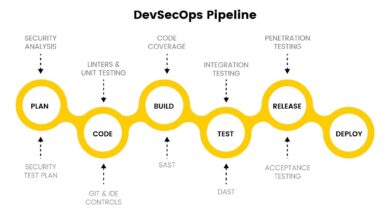
7. Security from the Start
Security should be part of DevOps:
-
Scan images
-
Protect secrets
-
Secure APIs
This is called DevSecOps.
Simple Real-Life Example
Earlier:
-
One big app
-
Weekly deployments
-
Frequent downtime
After moving to microservices with DevOps:
-
Smaller releases
-
Faster deployments
-
Only affected services fail
-
Better user experience
Final Thoughts
Moving from monolith to microservices is not only a code change.
It is a process and mindset change.
With proper DevOps:
-
Teams work faster
-
Systems become stable
-
Scaling becomes easy
Without DevOps:
-
Complexity increases
-
Failures become harder to manage
Microservices + DevOps = Faster, safer, scalable applications