BlogDevOps

DevOps Toolchain: An Overview of Tools for the Entire Software Lifecycle

An end-to-end guide to tools that power modern software delivery

Spread the love
youtube

DevOps is not a single tool or technology—it is a culture and practice that brings development and operations teams together to deliver software faster, more reliably, and at scale.
At the heart of DevOps lies the DevOps toolchain: a set of integrated tools that support every stage of the software delivery lifecycle.

This article explains the DevOps toolchain end-to-end, covering tools used for planning, building, testing, deploying, monitoring, and configuration in simple and practical terms.

What Is a DevOps Toolchain?

A DevOps toolchain is a collection of tools that automate and integrate processes across the DevOps lifecycle.
Each tool focuses on a specific phase, but when combined, they create a continuous workflow known as CI/CD (Continuous Integration and Continuous Delivery).

Key goals of a DevOps toolchain:

  • Faster software delivery

  • Reduced manual errors

  • Better collaboration

  • Continuous feedback and improvement

  • High system reliability in production


1. Planning Tools

Planning tools help teams define requirements, track progress, and manage tasks.

Purpose:

  • Requirement gathering

  • Sprint planning

  • Issue and bug tracking

  • Collaboration between teams

Popular tools:

  • Jira

  • Azure Boards

  • Trello

Why they matter:
Good planning ensures clarity, accountability, and alignment between business and engineering teams.


2. Source Code Management (SCM)

SCM tools manage application source code, track changes, and enable collaboration.

Purpose:

  • Version control

  • Branching and merging

  • Code history and rollback

  • Team collaboration

Popular tools:

  • Git

  • GitHub

  • GitLab

  • Bitbucket

Why they matter:
SCM is the foundation of DevOps—everything starts with code.


3. Build Tools

Build tools convert source code into executable artifacts.

Purpose:

  • Compile code

  • Resolve dependencies

  • Generate build artifacts (JAR, WAR, binaries)

Popular tools:

  • Maven

  • Gradle

  • npm

Why they matter:
Automated builds reduce human errors and ensure consistent outputs across environments.


4. Testing Tools

Testing tools validate application quality through automated testing.

Purpose:

  • Unit testing

  • Integration testing

  • Performance and load testing

  • Security testing

Popular tools:

  • Selenium

  • JUnit

  • TestNG

  • JMeter

Why they matter:
Early and automated testing helps catch bugs before production, saving time and cost.


5. Continuous Integration & Continuous Delivery (CI/CD)

CI/CD tools automate the build, test, and deployment pipeline.

Purpose:

  • Automatic code integration

  • Pipeline automation

  • Faster releases

  • Reduced deployment risk

Popular tools:

  • Jenkins

  • GitHub Actions

  • GitLab CI/CD

  • Azure DevOps

Why they matter:
CI/CD enables frequent, reliable, and automated deployments.


6. Deployment & Containerization Tools

These tools help package applications and deploy them consistently.

Purpose:

  • Container creation

  • Application isolation

  • Environment consistency

  • Scalable deployments

Popular tools:

  • Docker

  • Kubernetes

  • Amazon ECS

  • Helm

Why they matter:
Containers solve the classic problem: “It works on my machine.”


7. Configuration Management & Infrastructure as Code (IaC)

These tools manage infrastructure using code and automation.

Purpose:

  • Server provisioning

  • Configuration consistency

  • Infrastructure versioning

  • Automated scaling

Popular tools:

  • Ansible

  • Terraform

  • Chef

  • Puppet

Why they matter:
IaC makes infrastructure repeatable, auditable, and scalable.


8. Monitoring, Logging & Observability

Monitoring tools provide visibility into system health and performance.

Purpose:

  • Detect failures

  • Track performance metrics

  • Analyze logs

  • Improve reliability

Popular tools:

  • Prometheus

  • Grafana

  • ELK Stack

  • AWS CloudWatch

Why they matter:
Monitoring answers “Is something wrong right now?”, while observability explains “Why did it happen?”


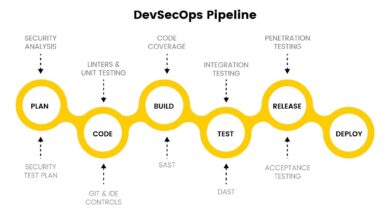
How All Tools Work Together

The real power of DevOps comes from integration:

  • Planning tools → define work

  • SCM → manage code

  • Build & test → ensure quality

  • CI/CD → automate delivery

  • Containers & IaC → ensure consistency

  • Monitoring → provide feedback

This creates a continuous feedback loop for improvement.

youtube

Related Articles

Back to top button
Close
Close